Visuals Reference

This page describes built-in Touch Portal Visuals actions, events and states. For other automation options, see the Touch Portal Capability Model.

Visuals Actions

Change Button Visuals
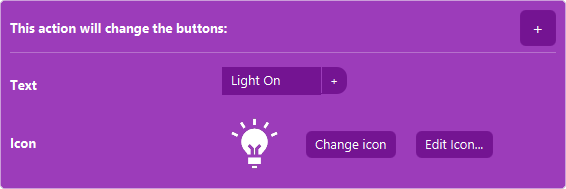
The Action 'Change Button Visuals' as visible in Touch Portal.

Action settings

+
This button allows you to select what attribute you want to change of the button. You can select multiple to make several changes at once.
This action allows you to change the visuals of a button
Action
Icon showing the Touch Portal category this item belongs to.

1.0

Available since
Touch Portal Logo used to accompany the version number this item was available from.
Green Windows Logo indicating this Action is supported on Windows.
Green macOS Logo indicating this Action is supported on macOS.
Green Linux Logo indicating this Action is supported on Linux.

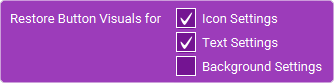
Restore Buttons Original Visuals

The Action 'Restore Buttons Original Visuals' as visible in Touch Portal.

Action settings

Options
the parts of the original button visuals you want to restore.
This action allows you to restore parts of the original button visuals setup.
Action
Icon showing the Touch Portal category this item belongs to.

4.0

Available since
Touch Portal Logo used to accompany the version number this item was available from.
Green Windows Logo indicating this Action is supported on Windows.
Green macOS Logo indicating this Action is supported on macOS.
Green Linux Logo indicating this Action is supported on Linux.

Change Visuals By Plug-in State

The Action 'Change Visuals By Plug-in State' as visible in Touch Portal.

Action settings

Option
the background color, the text color or the icon option
Param
the plugin state to use to update the chosen option.
This action allows you to change the background color, the text color or the icon from a plugin state.
Action
Icon showing the Touch Portal category this item belongs to.

2.2

Available since
Touch Portal Logo used to accompany the version number this item was available from.
Green Windows Logo indicating this Action is supported on Windows.
Green macOS Logo indicating this Action is supported on macOS.
Green Linux Logo indicating this Action is supported on Linux.

Url To Button Icon

The Action 'Url To Button Icon' as visible in Touch Portal.

Action settings

Url
A properly encoding url pointing to an PNG.
With this action you can load an url image and set that image as the icon.
Note: This action can only use PNG images.
Action
Icon showing the Touch Portal category this item belongs to.

4.0

Available since
Touch Portal Logo used to accompany the version number this item was available from.
Green Windows Logo indicating this Action is supported on Windows.
Green macOS Logo indicating this Action is supported on macOS.
Green Linux Logo indicating this Action is supported on Linux.

Change Page Background Image

The Action 'Change Page Background Image' as visible in Touch Portal.

Action settings

Image
the file of the image to
This action allows you to change the image of the Page.
Note: Pages background images can be quite big in memory. This means transferring the image from desktop to device can have a delayed if they are not yet cached. Loading big images can also result in out of memory crashes on older devices. If any issues, please make the image smaller.
Action
Icon showing the Touch Portal category this item belongs to.

4.0

Available since
Touch Portal Logo used to accompany the version number this item was available from.
Green Windows Logo indicating this Action is supported on Windows.
Green macOS Logo indicating this Action is supported on macOS.
Green Linux Logo indicating this Action is supported on Linux.

Change Graphics Upgrade Settings

The Action 'Change Graphics Upgrade Settings' as visible in Touch Portal.

Action settings

Graphics Upgrade
the details of the graphics upgrade can be set the same as when you set it through the button editor screen.
This action allows you to change the Graphics Upgrade settings for the button
Note: To remove graphics upgrades settings, add this action and use 'No Upgrade'
Action
Icon showing the Touch Portal category this item belongs to.

2.3

Available since
Touch Portal Logo used to accompany the version number this item was available from.
Green Windows Logo indicating this Action is supported on Windows.
Green macOS Logo indicating this Action is supported on macOS.
Green Linux Logo indicating this Action is supported on Linux.

Change Page Graphics Upgrade Setting

The Action 'Change Page Graphics Upgrade Setting' as visible in Touch Portal.

Action settings

Graphics Upgrade
the settings the same as when you set the graphics upgrade for a Page in the Page editor.
This action allows you to change the graphics upgrade settings for a Page.
Action
Icon showing the Touch Portal category this item belongs to.

2.3

Available since
Touch Portal Logo used to accompany the version number this item was available from.
Green Windows Logo indicating this Action is supported on Windows.
Green macOS Logo indicating this Action is supported on macOS.
Green Linux Logo indicating this Action is supported on Linux.

Visuals Events

Keep Button Icon The Same As External File

The Event 'Keep Button Icon The Same As External File' as visible in Touch Portal.

Event settings

File
A full path pointing to the image file to keep track of and update the icon with.
This event will keep track of the image file pointed to. Whenever the file is changed, it will update the icon of the button.
Note: This event can only use JPG and PNG images.
Event
Icon showing the Touch Portal category this item belongs to.

4.0

Available since
Touch Portal Logo used to accompany the version number this item was available from.
Green Windows Logo indicating this Event is supported on Windows.
Green macOS Logo indicating this Event is supported on macOS.
Green Linux Logo indicating this Event is supported on Linux.