Touch Portal Specific Reference
This page describes built-in Touch Portal Touch Portal Specific actions, events and states. For other automation options, see the Touch Portal Capability Model.
Touch Portal Specific Actions
Log

Action settings
Log Text
The log text to add as an entry in the logs.
This action allows you to add log entries in the Touch Portal logs. This can be useful to check out how your setup works and when something is wrong, to find out what is going on.
Action

4.5
Available since


Refresh Webview

Action settings
Webview ID
the ID of the webview as can be set in the webview settings.
This action allows you to refresh the browser of a specific webview with the given id. The webview needs to be visible on a connected device.
Action
4.3
Available since
Restart Touch Portal

With this action you can restart Touch Portal.
Note: When executing this action, actions that follow this might not be executed or might not be fully executed. Use this action as the last in the flow of actions.
Action
4.0
Available since
Set / Load Webview Url

Action settings
URL
the URL to set the webview to
Webview ID
the ID of the webview as can be set in the webview settings.
This action allows you to load a new URL in the specified webview.
Action
4.3
Available since
Switch Event On / Off
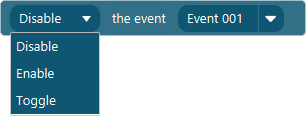
Action settings
Option
The state to put the event in.
Event
The event to change the state of.
This action allows you to turn global Event on and off.
Action
2.3
Available since
Comment
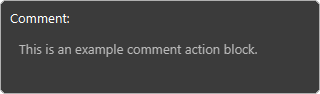
Action settings
Comment
the text you want add as a comment in the flow.
This action allows you to add comments in your flow of actions. This comment action does not execute anything.
Action
2.1
Available since
Toggle Plugin Action
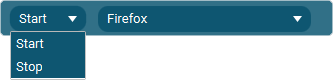
Action settings
Option
Start or Stop a plugin
Plugin
The plugin to start of stop
This action allows you to start or stop plugins using actions
Action
4.0
Available since
Touch Portal Specific Events
On Touch Portal Initialized

This event is triggered when Touch Portal is initialized.
Note: This will only trigger if the mobile device is running Touch Portal and has been previously connected to the desktop application. This will only work if you have the Pro Upgrade.
Event
4.0
Available since