Lightroom Classic Reference

This page describes built-in Touch Portal Lightroom Classic actions, events and states. For other automation options, see the Touch Portal Capability Model.

Lightroom Classic Actions

Add/remove Photo Keyword
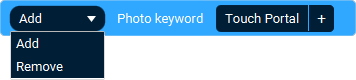
The Action 'Add/remove Photo Keyword' as visible in Touch Portal.

Action settings

Action
Add or Remove
Keyword
The keyword to add or to remove.
This action allows you to add keywords to a photo.
Action

Icon showing the Touch Portal category this item belongs to.

4.0

Available since
Touch Portal Logo used to accompany the version number this item was available from.
Green Windows Logo indicating this Action is supported on Windows.
Green macOS Logo indicating this Action is supported on macOS.
Red Linux Logo indicating this Action is NOT supported on Linux.

Apply Develop Auto Tone

The Action 'Apply Develop Auto Tone' as visible in Touch Portal.
This action allows you to apply auto tone in Develop
Action
Icon showing the Touch Portal category this item belongs to.

4.0

Available since
Touch Portal Logo used to accompany the version number this item was available from.
Green Windows Logo indicating this Action is supported on Windows.
Green macOS Logo indicating this Action is supported on macOS.
Red Linux Logo indicating this Action is NOT supported on Linux.

Apply Develop Auto White Balance

The Action 'Apply Develop Auto White Balance' as visible in Touch Portal.
This action allows you to apply auto white balance in Develop
Action
Icon showing the Touch Portal category this item belongs to.

4.0

Available since
Touch Portal Logo used to accompany the version number this item was available from.
Green Windows Logo indicating this Action is supported on Windows.
Green macOS Logo indicating this Action is supported on macOS.
Red Linux Logo indicating this Action is NOT supported on Linux.

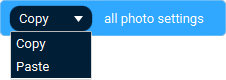
Copy/paste Photo Settings

The Action 'Copy/paste Photo Settings' as visible in Touch Portal.

Action settings

Action
Copy or Paste
This action allows you to copy or paste the photosettings
Action
Icon showing the Touch Portal category this item belongs to.

4.0

Available since
Touch Portal Logo used to accompany the version number this item was available from.
Green Windows Logo indicating this Action is supported on Windows.
Green macOS Logo indicating this Action is supported on macOS.
Red Linux Logo indicating this Action is NOT supported on Linux.

Reset All Adjustments In Develop

The Action 'Reset All Adjustments In Develop' as visible in Touch Portal.
This action allows you to reset all adjustments in Develop
Action
Icon showing the Touch Portal category this item belongs to.

4.0

Available since
Touch Portal Logo used to accompany the version number this item was available from.
Green Windows Logo indicating this Action is supported on Windows.
Green macOS Logo indicating this Action is supported on macOS.
Red Linux Logo indicating this Action is NOT supported on Linux.

Reset All Transformations In Develop

The Action 'Reset All Transformations In Develop' as visible in Touch Portal.
This action allows you to reset all transformations in Develop
Action
Icon showing the Touch Portal category this item belongs to.

4.0

Available since
Touch Portal Logo used to accompany the version number this item was available from.
Green Windows Logo indicating this Action is supported on Windows.
Green macOS Logo indicating this Action is supported on macOS.
Red Linux Logo indicating this Action is NOT supported on Linux.

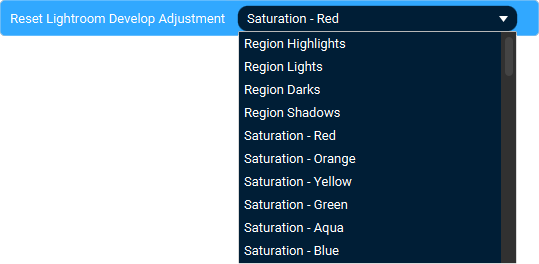
Reset Single Adjustment In Develop

The Action 'Reset Single Adjustment In Develop' as visible in Touch Portal.

Action settings

Parameter
The adjustment parameter to reset.
This action allows you to reset a specific the adjustment in Develop
Action
Icon showing the Touch Portal category this item belongs to.

4.0

Available since
Touch Portal Logo used to accompany the version number this item was available from.
Green Windows Logo indicating this Action is supported on Windows.
Green macOS Logo indicating this Action is supported on macOS.
Red Linux Logo indicating this Action is NOT supported on Linux.

Set Develop Color Grading

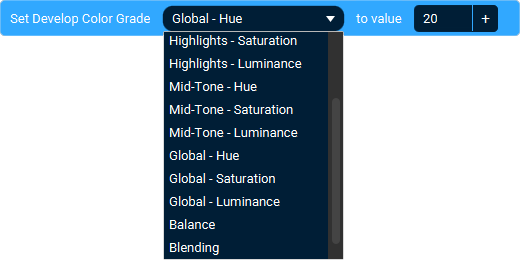
The Action 'Set Develop Color Grading' as visible in Touch Portal.

Action settings

Component
Color Grading component to set value of
Value
The new value of the component
This action allows you to set a color grade value
Action
Icon showing the Touch Portal category this item belongs to.

4.0

Available since
Touch Portal Logo used to accompany the version number this item was available from.
Green Windows Logo indicating this Action is supported on Windows.
Green macOS Logo indicating this Action is supported on macOS.
Red Linux Logo indicating this Action is NOT supported on Linux.

Set Develop Color Mixer

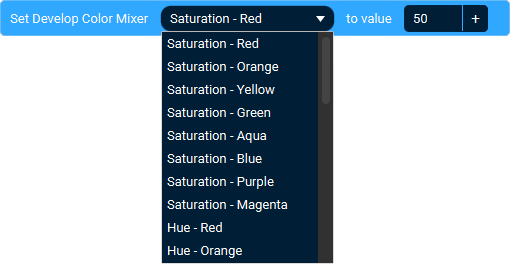
The Action 'Set Develop Color Mixer' as visible in Touch Portal.

Action settings

Parameter
The color mixer parameter to adjust.
Value
The value to set it to.
This action allows you to change an color mixer parameter
Action
Icon showing the Touch Portal category this item belongs to.

4.0

Available since
Touch Portal Logo used to accompany the version number this item was available from.
Green Windows Logo indicating this Action is supported on Windows.
Green macOS Logo indicating this Action is supported on macOS.
Red Linux Logo indicating this Action is NOT supported on Linux.

Set Develop Color Tone

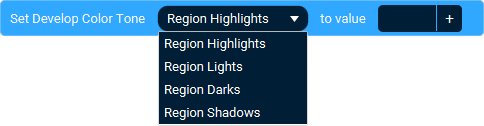
The Action 'Set Develop Color Tone' as visible in Touch Portal.

Action settings

Parameter
The color tone parameter to adjust.
Value
The value to set it to.
This action allows you to change an color tone parameter
Action
Icon showing the Touch Portal category this item belongs to.

4.0

Available since
Touch Portal Logo used to accompany the version number this item was available from.
Green Windows Logo indicating this Action is supported on Windows.
Green macOS Logo indicating this Action is supported on macOS.
Red Linux Logo indicating this Action is NOT supported on Linux.

Set Develop Details

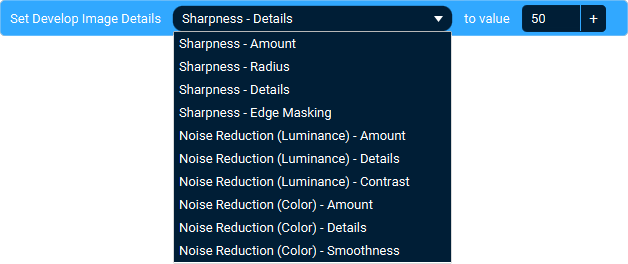
The Action 'Set Develop Details' as visible in Touch Portal.

Action settings

Parameter
The detail parameter to adjust.
Value
The value to set it to.
This action allows you to change the Develop details
Action
Icon showing the Touch Portal category this item belongs to.

4.0

Available since
Touch Portal Logo used to accompany the version number this item was available from.
Green Windows Logo indicating this Action is supported on Windows.
Green macOS Logo indicating this Action is supported on macOS.
Red Linux Logo indicating this Action is NOT supported on Linux.

Set Develop Image Adjustment

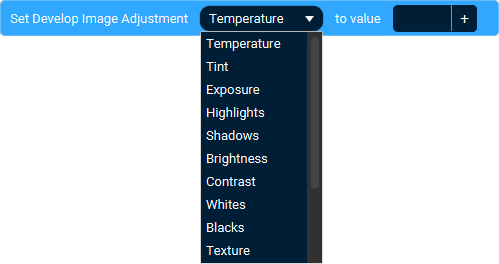
The Action 'Set Develop Image Adjustment' as visible in Touch Portal.

Action settings

Parameter
The image adjustment parameter to adjust.
Value
The value to set it to.
This action allows you to change an Image Adjustment parameter
Action
Icon showing the Touch Portal category this item belongs to.

4.0

Available since
Touch Portal Logo used to accompany the version number this item was available from.
Green Windows Logo indicating this Action is supported on Windows.
Green macOS Logo indicating this Action is supported on macOS.
Red Linux Logo indicating this Action is NOT supported on Linux.

Set Develop Tool

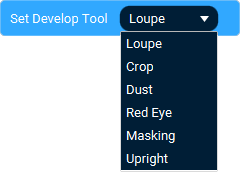
The Action 'Set Develop Tool' as visible in Touch Portal.

Action settings

Tool
The tool to set.
This action allows you to change the tool in Develop
Action
Icon showing the Touch Portal category this item belongs to.

4.0

Available since
Touch Portal Logo used to accompany the version number this item was available from.
Green Windows Logo indicating this Action is supported on Windows.
Green macOS Logo indicating this Action is supported on macOS.
Red Linux Logo indicating this Action is NOT supported on Linux.

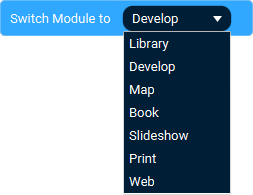
Switch Module

The Action 'Switch Module' as visible in Touch Portal.

Action settings

Module
The module to switch to
This action allows you to switch to a different module.
Action
Icon showing the Touch Portal category this item belongs to.

4.0

Available since
Touch Portal Logo used to accompany the version number this item was available from.
Green Windows Logo indicating this Action is supported on Windows.
Green macOS Logo indicating this Action is supported on macOS.
Red Linux Logo indicating this Action is NOT supported on Linux.

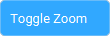
Toggle Zoom

The Action 'Toggle Zoom' as visible in Touch Portal.
This action allows you to toggle the zoom
Action
Icon showing the Touch Portal category this item belongs to.

4.0

Available since
Touch Portal Logo used to accompany the version number this item was available from.
Green Windows Logo indicating this Action is supported on Windows.
Green macOS Logo indicating this Action is supported on macOS.
Red Linux Logo indicating this Action is NOT supported on Linux.

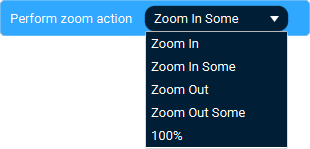
Zoom In Or Out

The Action 'Zoom In Or Out' as visible in Touch Portal.

Action settings

Zoom mode
The zoom mode when executing this action.
This action allows you to zoom in or out.
Action
Icon showing the Touch Portal category this item belongs to.

4.0

Available since
Touch Portal Logo used to accompany the version number this item was available from.
Green Windows Logo indicating this Action is supported on Windows.
Green macOS Logo indicating this Action is supported on macOS.
Red Linux Logo indicating this Action is NOT supported on Linux.

Lightroom Classic Events

When Current Image Changes

The Event 'When Current Image Changes' as visible in Touch Portal.
This event allows you to react on when you have changed images.
Event
Icon showing the Touch Portal category this item belongs to.

4.0

Available since
Touch Portal Logo used to accompany the version number this item was available from.
Green Windows Logo indicating this Event is supported on Windows.
Green macOS Logo indicating this Event is supported on macOS.
Red Linux Logo indicating this Event is NOT supported on Linux.

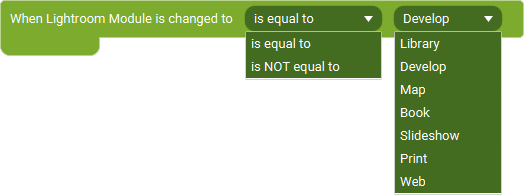
When Current Image Changes

The Event 'When Current Image Changes' as visible in Touch Portal.
This event allows you to react on when you have changed module.
Event
Icon showing the Touch Portal category this item belongs to.

4.0

Available since
Touch Portal Logo used to accompany the version number this item was available from.
Green Windows Logo indicating this Event is supported on Windows.
Green macOS Logo indicating this Event is supported on macOS.
Red Linux Logo indicating this Event is NOT supported on Linux.