Timers Reference
This page describes built-in Touch Portal Timers actions, events and states. For other automation options, see the Touch Portal Capability Model.
Timers Actions
Wait For (timer)
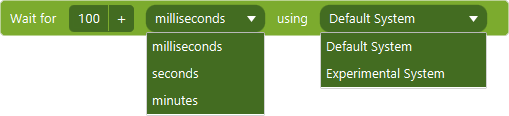
Action settings
Value
The time value
Unit
The unit of time to use with the value.
System
The default system uses less resources but is less precise. The Experimental system uses more resources but it more precise.
This action allows you to add a time to wait. This will pause the execution of the flow of actions until the timer has finished.
Note: The default system can show spikes of longer wait times when the system is very busy and all system resources are used near 100%. If this happens, use the experimental system.
Action

1.0
Available since


