Values & Text Reference
This page describes built-in Touch Portal Values & Text actions, events and states. For other automation options, see the Touch Portal Capability Model.
Values & Text Actions
Set Value Capitalization
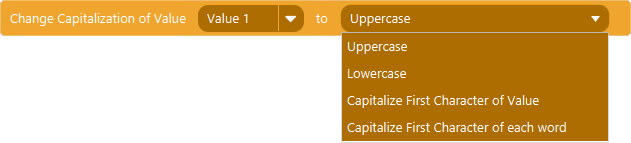
Action settings
Value
The Value to capitalize
Option
The option for capitalisation
This action allows you to capitalize the text Value.
Action

4.0
Available since


Replace (regex) In Value

Action settings
Token (regex)
The regex token to search for in the Value
Replacement
The replacement to replace the regex token with in the Value
Value
The Value object to store the results in
This action allows you to replace a given part of the Value Object with another value.
Note: If you want to add newlines to the Value, you can use {tpnewline} which are replaced by the systems newline character combination when used in this action.
Action
2.3
Available since
Get Subtext

Action settings
Value
The value to store the results in
Text
The text to get the part of
Range start
index of the start of the sub text
Range end
index of the end of the sub text
This action allows you to get part of a text Value
Action
4.0
Available since
Get Length Of Value

Action settings
Value
The Value to store the length of the given text in.
Text
The text to get the length of.
This action allows you to get the length of a given text and store it into a Value.
Action
4.0
Available since
Trim Value

Action settings
Value
The Value to trim
This action allows you to trim the text Value
Action
4.0
Available since
Split Value And Get N-th

Action settings
Value
The Value to store the results in
n-th
The index of the item to get from the split collection
Text
The text to split
Delimiter
the character or text to split the text with.
This action allows you to split a text with a delimiter and get the nth item from the split text.
Note: The n-th index is zero based. This means the first item in the collection is 0.
Note: The delimiter works using regex, therefor you need to escape special characeters like <([{\^-=$!|]})?*+.> with escape character \ otherwise they are handled as the function they represent in regex
Action
4.0
Available since
Get Index Of

Action settings
Value
the Value to store the results in
Token
the character or text to get the index of
Text
the Text to search for the token
This action allows you to get the index of a given character or text from a text
Note: This will save the index if found or it will save -1 in the Value if the token is not found.
Note: The index is zero based.
Action
4.0
Available since
Get Occurrence Count

Action settings
Value
the Value to store the results in
Token
the character or text to get the occurence count of
Text
the Text to search for the token
This action allows you to count occurences of text in a text and store it into a Value
Action
4.0
Available since
Get Last Index Of

Action settings
Value
the Value to store the results in
Token
the character or text to get the last index of
Text
the Text to search for the token
This action allows you to get the last index of a given character or text from a text
Note: This will save the last index if found or it will save -1 in the Value if the token is not found.
Note: The index is zero based.
Action
4.5
Available since