Values Reference
This page describes built-in Touch Portal Values actions, events and states. For other automation options, see the Touch Portal Capability Model.
Values Actions
Set Value To / Change Value To

Action settings
Value Object
The Value Object to change
value
the new value the Value Object should hold.
This action allows you to change what the Value.
Action

2.1
Available since


Set Value To / Change Value To (multiline)

Action settings
Value
The Value to change
value
what the new contents of the Value should be.
This action allows you to change the Value to a given text.
Action
4.5
Available since
Get Url Content And Store In Value

Action settings
url
the url to get the contents from
Value Object
The Value Object to store the url contents into.
This action allows you to retrieve the contents from an URL and store it into the specified Value
Action
2.3
Available since
Values Events
When Value Changes
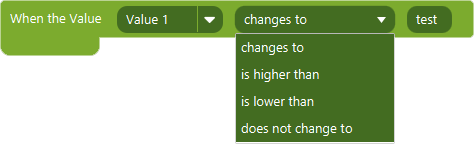
Event settings
Value
the Value to listen for a change
Param
the comparator for the Value change
Param
the token for the comparator
This event allows you to trigger on when a Value changes.
Note: To listen for every change of the specific Value, use the 'does not change to' and use a token which will never happen. This will make the event trigger always for that Value.
Event
2.1
Available since
When Plugin Value Changes
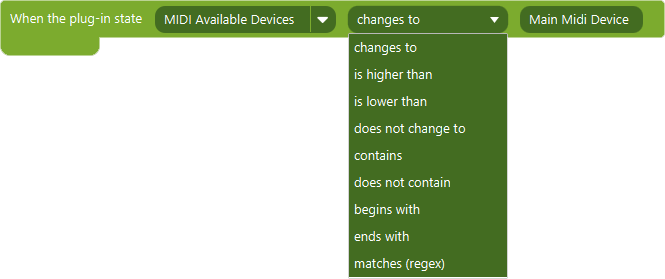
Event settings
Value
the plugin state to listen for a change
Param
the comparator for the plugin state change
Param
the token for the comparator
This event allows you to trigger on when a Plugin State changes.
Note: To listen for every change of the specific plugin state, use the 'does not change to' and use a token which will never happen. This will make the event trigger always for that plugin state.
Event
2.1
Available since