HTTP Calls Reference
This page describes built-in Touch Portal HTTP Calls actions, events and states. For other automation options, see the Touch Portal Capability Model.
HTTP Calls Actions
Http Get
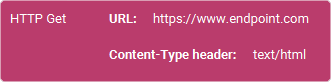
Action settings
Url
The endpoint you want to send the GET call to.
Headers
Authorization
This optional http header can be used to add Authorization Headers if the call requires this. Leave empty if you do not want to add authorization headers.
Content-Type
This optional http header can be used to add content-type headers. Leave empty if you do not want to add content-type headers.
This action allows you to do a GET call to a given endpoint.
Note: The GET call is done with no additional headers except a default user-agent being 'TouchPortal'.
Note: The result of this call and the http codes are set to the local states when this action is used. You can use them by selecting the http dynamic text variables from the selector list.
Action

1.10
Available since


Http Post

Action settings
Url
The endpoint you want to send the POST call to
Data
The data you want to send as POST data. This data will be send as a UTF-8 encoded string. The format depends on the endpoint and Touch Portal does not prepare the data for you. You need to prepare the data so that it will be accepted by the endpoint.
Optional Headers
Authorization
This optional header can be used to add Authorization Headers if the call requires this. Leave empty if you do not want to add authorization headers.
Content-Type
This optional header can be used to add content-type headers. Leave empty if you do not want to add content-type headers.
Custom header 1
This optional header can be used to add an additional header with a custom key and value.
Custom header 2
This optional header can be used to add an additional header with a custom key and value.
Custom header 3
This optional header can be used to add an additional header with a custom key and value.
This action allows you to do a POST call to a given endpoint.
Note: The POST call is done with no additional headers. If you do not specify a 'user-agent' in the custom headers, the default 'TouchPortal' will be added as a user-agent.
Note: The result of this call and the http codes are set to the local states when this action is used. You can use them by selecting the http dynamic text variables from the selector list.
Action
1.10
Available since
Http Put

Action settings
Url
The endpoint you want to send the PUT call to
Data
The data you want to send as PUT data. This data will be send as a UTF-8 encoded string. The format depends on the endpoint and Touch Portal does not prepare the data for you. You need to prepare the data so that it will be accepted by the endpoint.
Optional Headers
Authorization
This optional header can be used to add Authorization Headers if the call requires this. Leave empty if you do not want to add authorization headers.
Content-Type
This optional header can be used to add content-type headers. Leave empty if you do not want to add content-type headers.
Custom header 1
This optional header can be used to add an additional header with a custom key and value.
Custom header 2
This optional header can be used to add an additional header with a custom key and value.
Custom header 3
This optional header can be used to add an additional header with a custom key and value.
This action allows you to do a PUT call to a given endpoint.
Note: The PUT call is done with no additional headers. If you do not specify a 'user-agent' in the custom headers, the default 'TouchPortal' will be added as a user-agent.
Note: The result of this call and the http codes are set to the local states when this action is used. You can use them by selecting the http dynamic text variables from the selector list.
Action
2.1
Available since
Http Patch

Action settings
Url
The endpoint you want to send the PATCH call to
Data
The data you want to send as PATCH data. This data will be send as a UTF-8 encoded string. The format depends on the endpoint and Touch Portal does not prepare the data for you. You need to prepare the data so that it will be accepted by the endpoint.
Optional Headers
Authorization
This optional header can be used to add Authorization Headers if the call requires this. Leave empty if you do not want to add authorization headers.
Content-Type
This optional header can be used to add content-type headers. Leave empty if you do not want to add content-type headers.
Custom header 1
This optional header can be used to add an additional header with a custom key and value.
Custom header 2
This optional header can be used to add an additional header with a custom key and value.
Custom header 3
This optional header can be used to add an additional header with a custom key and value.
This action allows you to do a PATCH call to a given endpoint.
Note: The PATCH call is done with no additional headers. If you do not specify a 'user-agent' in the custom headers, the default 'TouchPortal' will be added as a user-agent.
Action
4.0
Available since
Http Delete

Action settings
Url
The endpoint you want to send the DELETE call to
Data
The data you want to send as DELETE data. This data will be send as a UTF-8 encoded string. The format depends on the endpoint and Touch Portal does not prepare the data for you. You need to prepare the data so that it will be accepted by the endpoint.
Optional Headers
Authorization
This optional header can be used to add Authorization Headers if the call requires this. Leave empty if you do not want to add authorization headers.
Content-Type
This optional header can be used to add content-type headers. Leave empty if you do not want to add content-type headers.
Custom header 1
This optional header can be used to add an additional header with a custom key and value.
Custom header 2
This optional header can be used to add an additional header with a custom key and value.
Custom header 3
This optional header can be used to add an additional header with a custom key and value.
This action allows you to do a DELETE call to a given endpoint.
Note: The DELETE call is done with no additional headers. If you do not specify a 'user-agent' in the custom headers, the default 'TouchPortal' will be added as a user-agent.
Note: The http DELETE protocol data body has been a debate of whether it should be possible but the protocol allows it and while most clients and server ignore the body, some might not. Be sure to query the documentation of the end point you are trying to reach on how it handles the DELETE calls.
Action
4.0
Available since